<img height="1" width="1" style="display:none" src="https://www.facebook.com/tr?id=314834185700910&amp;ev=PageView&amp;noscript=1">

Retirement Guide for Microsoft Employees

2026 Tax Rates & Inflation

In our comprehensive retirement guide for Microsoft employees, we go through many factors which you may take into account when deciding on the proper time to retire from Microsoft. Some of those factors include: healthcare & benefit changes, interest rates, the new 2026 tax rates, inflation, and much more. Keep in mind we are not affiliated with Microsoft, and we recommend reaching out to your Corporate benefits department for further information.

Table of Contents

2026 Tax Changes & Inflation

NGC-HTML-Inflation

It is important to know the IRS changes for 2026. The main ones that may affect Microsoft employees are:

  • For 2026, the standard deduction is $16,100 for single filers and those married filing separately, $32,200 for married couples filing jointly, and $24,150 for heads of household.

  • Taxpayers who are 65 or older or blind can add an additional $1,650 to their standard deduction for 2026. That amount is $2,050 if they are also unmarried and not a surviving spouse.
  • For 2025 through 2028, taxpayers age 65 and older may also claim a new deduction of up to $6,000 each ($12,000 for a married couple who both qualify). It phases out above $75,000 of modified adjusted gross income ($150,000 for joint filers).


Retirement account contributions: Contributing to your company's 401(k) plan can cut your tax bill significantly. For 2026, individuals can contribute $24,500 to 401(k), 403(b), and most 457 plans. The catch-up contribution limit for employees age 50 and over is $8,000. For those turning 60 - 63 during calendar year 2026, the SECURE 2.0 super catch-up limit remains $11,250.

Earned Income Tax Credit (EITC) points to know for 2026:

  • The tax year 2026 maximum Earned Income Tax Credit amount is $8,231 for qualifying taxpayers who have three or more qualifying children.
  • Married taxpayers filing separately can qualify: You can claim the EITC as married filing separately if you meet other qualifications.


Deduction for cash charitable contributions: Beginning in 2026, taxpayers who do not itemize may deduct up to $1,000 ($2,000 for married couples filing jointly) of cash contributions to qualifying charities.

Child Tax Credit changes:

  • For tax year 2026, the Child Tax Credit is up to $2,200 per qualifying child, subject to income limits and IRS eligibility rules.
  • The credit begins to phase out above $200,000 of modified adjusted gross income ($400,000 for married couples filing jointly).
  • Part of the credit may be refundable for taxpayers whose tax bill is lower than the credit amount, subject to IRS limits.


2026 Federal Income Tax Brackets

Rate Single Married Filing Jointly Married Filing Separately Head of Household
10% $0 - $12,400 $0 - $24,800 $0 - $12,400 $0 - $17,700
12% $12,401 - $50,400 $24,801 - $100,800 $12,401 - $50,400 $17,701 - $67,450
22% $50,401 - $105,700 $100,801 - $211,400 $50,401 - $105,700 $67,451 - $105,700
24% $105,701 - $201,775 $211,401 - $403,550 $105,701 - $201,775 $105,701 - $201,750
32% $201,776 - $256,225 $403,551 - $512,450 $201,776 - $256,225 $201,751 - $256,200
35% $256,226 - $640,600 $512,451 - $768,700 $256,226 - $384,350 $256,201 - $640,600
37% $640,601+ $768,701+ $384,351+ $640,601+

Source: IRS IR-2025-103 / Revenue Procedure 2025-32.

Inflation remains an important 2026 retirement planning factor because higher prices can reduce purchasing power over time. When building a retirement income plan, consider current inflation assumptions, Medicare costs, prescription drug costs, and other health care expenses alongside the 2026 tax brackets and deduction limits above.

 It is important to consider all of these factors when building your plan for retirement from Microsoft.

*Source: IRS (IR-2025-103, Rev. Proc. 2025-32, Tax Topic 506, One Big Beautiful Bill Act deductions for seniors)

Blogs You May Enjoy:


New call-to-action

New call-to-action

New call-to-action

additional-articles-trg-1

Planning Your Retirement

Life after Retirement (graphic)

Retirement planning is a verb; consistent action must be taken whether you’re 20 or 60.

The truth is that most Americans don’t know how much to save or the amount of income they’ll need.

No matter where you stand in the planning process, or your current age, we hope this guide provides you a good overview of the steps to take and resources that help you simplify your transition from your company into retirement and get the most from your benefits.

You know you need to be saving and investing, especially since time is on your side the sooner you start, but you don’t have the time or expertise to know if you’re building retirement savings that can last after leaving your company.

A plan that brings together your savings, stock, benefits and taxes can help you see whether you are on track for retirement.

Starting to save as early as possible matters. Time on your side means compounding can have significant impacts on your future savings. And, once you’ve started, increasing your 401(k) contributions over time can make a meaningful difference.

Starting early and staying invested in your company's retirement plan gives compounding more time to work.

As decades go by, you’re likely full swing into your career at your company and your income probably reflects that. However, the challenges of saving for retirement start coming from large competing expenses: a mortgage, raising children, and saving for their college.

One of the classic planning conflicts is saving for retirement versus saving for college. Most financial planners will tell you that retirement from your company should be your top priority because your child can usually find support from financial aid while you’ll be on your own to fund your retirement.

How much we recommend that you invest towards your retirement is always based on your unique financial situation and goals. However, consider investing a minimum of 10% of your salary toward retirement through your 30s and 40s.

As you enter your 50s and 60s, you’re ideally at your peak earning years with some of your major expenses, such as a mortgage or child-rearing, behind you or soon to be in the rearview mirror. This can be a good time to consider whether you have the ability to boost your retirement savings goal to 20% or more of your income. For many people, this could potentially be the last opportunity to stash away funds.

In 2026, workers age 50 or older can invest up to $24,500 into their retirement plan/401(k), and once they meet this limit, they can add an additional $8,000 in catch-up contributions for a combined annual total of $32,500. These limits are adjusted annually for inflation.

Why are 401(k)s and matching contributions so popular?

These retirement savings vehicles give you the chance to take advantage of three main benefits:

  • Compound growth opportunities (as seen above)
  • Tax saving opportunities
  • Matching contributions

Matching contributions are just what they sound like: your company matches your own 401(k) contributions with money that comes from the company. If your company matches, the company money typically matches up to a certain percent of the amount that you put in.

Unfortunately, many people fail to take advantage of their company's matching contributions because they’re not contributing the required minimum to receive the full company match. 
At Microsoft, the match is 50% of every pre-tax and/or Roth dollar you contribute, up to the IRS annual basic deferral limit, and you are 100% vested in it from the start. For 2026, contributing the full $24,500 limit would earn a Microsoft match of $12,250.

For example, if you earn $150,000 and contribute 10% of your pay ($15,000), Microsoft's match would be $7,500. Raising your contribution to the $24,500 limit would raise the match to $12,250. Because the match is capped at the basic limit, catch-up contributions above $24,500 do not add to it.


Schedule a Call

Deferred Compensation & Stock

Whether you’re changing jobs or retiring from your company, knowing what to do with your hard-earned retirement savings can be difficult. Your Microsoft 401(k) and stock awards may make up the majority of your retirement savings, but how much do you really know about how they work?
 
There are seemingly endless rules that vary from one plan to the next: early retirement offers, stock award vesting dates, age penalties, and complex tax impacts.
 
Growing your savings and managing taxes are important parts of a retirement income strategy. At The Retirement Group, we can help you understand how your company's 401(k) fits into your overall financial picture and how to make that plan work for you.
 
"Getting help and leveraging the financial planning tools and resources your company
makes available can help you understand whether you are on track, or need to
make adjustments to meet your long-term retirement goals..."
 
Source: Schwab 401(k) Survey Finds Savings Goals and Stress Levels on the Rise

Microsoft's Deferred Compensation Plan (DCP)

Microsoft offers a Deferred Compensation Plan (DCP) to U.S. employees at stock level 67 and above. This plan allows eligible employees to defer a portion of their salary and bonuses into future years, which may lower their current income taxes, with income tax on the deferred amount postponed until it is paid out.

The key benefit of the DCP is the ability to defer large amounts of compensation beyond what is allowed in tax-advantaged retirement plans such as a 401(k).

Eligibility

The DCP is available to Microsoft employees working in the U.S. at stock level 67 and above. Eligible employees can defer up to 75% of base salary and up to 100% of an annual bonus.

Deferral elections are generally made during an open enrollment period in the year before the pay is earned, and newly eligible employees have a separate election window.

Contribution Options

Deferrals are tax-deferred, meaning income tax is generally paid when the money is distributed rather than when it is earned. However, DCP balances are an unsecured, unfunded promise by Microsoft to pay in the future: if the company became insolvent, participants would be general creditors, so deferred compensation could be at risk.

Investment and Payout Options

Deferred compensation is tracked in a bookkeeping account rather than invested directly. Earnings, gains and losses are credited based on the investment options you choose, which may include options offered in the 401(k) plan. When you make each deferral election, you choose to receive it as a lump sum or in annual installments over 3 to 15 years, which can help you spread the tax over retirement.

Example Calculation (hypothetical):

Salary: $250,000

Bonus: $100,000

Deferred: 50% of salary ($125,000) and 75% of the bonus ($75,000) = $200,000 deferred

Deferring $200,000 lowers this year's taxable income by $200,000, so the federal income tax on it is postponed until it is paid out.

The actual savings depend on your tax bracket in the year you defer and in the years you are paid, which may be lower or higher. Social Security and Medicare taxes generally still apply in the year the pay is earned, and the deferred amount and any earnings are taxed as ordinary income when distributed.


Microsoft Restricted Stock Units (RSUs)

At Microsoft, stock compensation is a significant part of the total compensation package for many employees.

Microsoft offers Restricted Stock Units (RSUs) to employees as part of their annual compensation, performance bonuses, or signing packages. RSUs align employees' incentives with the company’s performance, allowing them to share in Microsoft’s success.

How RSUs Work

RSUs are granted to employees as part of their compensation. The shares are "restricted" until they vest, meaning employees do not own them outright until certain conditions, typically tied to continued employment, are met.

According to Microsoft's FY2026 annual report, stock awards generally vest over a service period of four or five years. Restricted stock units granted to executive officers and certain senior executives generally vest over four years, and their performance stock units (PSUs) over a three-year performance period. Your award agreement sets your own vesting schedule.

What happens to unvested awards when you leave depends on the stock plan and your award agreement, so check them before choosing a departure date.

Example Calculation (hypothetical)

Let’s assume an employee, John, is granted 1,000 RSUs at a stock price of $250 per share.

 * Vesting Schedule: 200 shares vest per year over five years.

 * Value at Vesting: If the stock price remains at $250 per share, John will have $50,000 worth of RSUs that vest each year (200 shares × $250 per share).

When the RSUs vest, the value is treated as ordinary income for tax purposes. Assuming John's vested RSU income is taxed at a 35% federal rate, his federal income tax on it would be (Social Security, Medicare and any state tax are extra):

  * Taxable Income: $50,000 in the year of vesting.

  * Tax Due: $17,500 (35% of $50,000).

If John decides to sell the shares immediately after vesting, he will only pay the income tax with no capital gains tax. However, if he holds the shares and they appreciate, he will pay tax on any capital gains from the time of vesting to the time of sale.

Employee Stock Purchase Plan (ESPP)

In addition to RSUs, Microsoft also offers an Employee Stock Purchase Plan (ESPP), allowing employees to purchase Microsoft stock at a 10% discount.

Employees can purchase shares worth up to 15% of their gross compensation, bought on the last trading day of each three-month period at 90% of the stock's fair market value that day.

Your 401(k) Plan

US-Bank-HTML-Your-401k-Plan

401(k) Savings Plan

Employees are encouraged to enroll in the 401(k) plan right away at Fidelity NetBenefits. You may contribute on a pre-tax, Roth and/or after-tax basis and choose from various investment options with varying degrees of risk.

You can also roll over pre-tax and Roth amounts from other eligible plans.

Microsoft matches 50% of every pre-tax and/or Roth dollar you contribute, up to the IRS annual basic deferral limit ($24,500 for 2026, for a maximum match of $12,250).


Vesting

The match is fully vested immediately, which means you own the contributions made by Microsoft as soon as they are deposited into your account.

When you leave Microsoft, you can review your 401(k) distribution options and request a distribution through Fidelity NetBenefits or by calling (888) 810-6738. Please call The Retirement Group at (800)-900-5867 for more information and we can get you in front of a retirement-focused advisor.

Next Step:

  • Before you take a distribution, review the Special Tax Notice Regarding Plan Payments. It explains your rollover options and the federal tax implications for your vested account balance.
  • "What has Worked in Investing" & "8 Tenets when picking a Mutual Fund".
  • To learn about your distribution options, call The Retirement Group at (800)-900-5867. Click our e-book for more information on "Rollover Strategies for 401(k)s". Review your 401(k) beneficiary designation on Fidelity NetBenefits and update it if needed.


Microsoft 401(k)

Microsoft employees have access to the Microsoft Corporation Savings Plus 401(k) Plan, which can be a central part of your retirement savings because it combines your contributions with Microsoft's match. 

The plan lets you contribute part of your pay to a retirement account. Pre-tax contributions reduce your current taxable income. Roth contributions are taxed up front, and qualified withdrawals may be tax-free in retirement.

Eligibility

You are eligible if you are in an approved budgeted headcount, regular employment position with Microsoft, on the Microsoft US payroll and at least 18. Interns and visiting researchers are not eligible. Enrollment generally takes effect within two pay periods.

Contribution Limits and Matching

For 2026, the contribution limits are:

 * Under 50 years old: $24,500

 * 50 years or older: $32,500 (including an $8,000 catch-up contribution)

 * Ages 60 to 63: $35,750 (including an $11,250 catch-up contribution)

Starting in 2026, if your prior-year Social Security (FICA) wages from Microsoft were over $150,000, your catch-up contributions must be made as Roth contributions.

Microsoft matches 50% of every pre-tax and/or Roth dollar you contribute, up to the IRS annual basic deferral limit, so the 2026 match can reach $12,250. You are 100% vested in the match from the start, which means it is yours even if you leave Microsoft.

Example Calculation:

Let's say you earn $120,000 a year and contribute 15% of your pay to the 401(k):

Your annual contribution: 15% of $120,000 = $18,000

Microsoft's match: 50% of $18,000 = $9,000

Total annual contribution to your 401(k): $18,000 (yours) + $9,000 (Microsoft's match) = $27,000

After-Tax Contributions (Mega Backdoor Roth)

The plan also accepts after-tax (non-Roth) contributions, which Microsoft's own checklist suggests converting to Roth, a strategy often called the Mega Backdoor Roth. It lets you save beyond the regular pre-tax/Roth limit:

The 2026 total limit on all contributions (yours, the match and after-tax) is $72,000 if you are under 50, $80,000 at 50 and older with catch-up contributions, and $83,250 at ages 60 to 63. Your combined contribution elections cannot exceed 65% of your eligible compensation.

Investment Options

The plan offers a mix of investment options for different risk tolerances, plus BrokerageLink, a self-directed brokerage window. Fidelity also offers investment guidance and advice services through the plan.

Using Your Plan Well

Consider contributing at least enough to receive the full Microsoft match.

Consider your tax situation when choosing between pre-tax and Roth contributions.
If you can save above the regular limit, after-tax contributions with Roth conversions may provide additional tax-advantaged savings.

Diversify your investments to manage risk and potential returns over your investment horizon.

Many plan participants say they don’t have the time, interest or knowledge needed to manage their 401(k) portfolio. Getting help may offer more than convenience.diversification-removebg-preview

It can also make it easier to stay on track with your 401(k).

Participants who use professional advice often report benefits such as:

  • Improved savings rates: a nudge to review and increase contributions.
  • Increased diversification: help spreading investments across asset classes.
  • Increased likelihood of staying the course: support sticking with long-term investment objectives during volatile markets. Don’t try to do it alone. Get help with your company's 401(k) plan investments. Your nest egg will thank you.
In-Service Withdrawals
 
Generally speaking, you can withdraw amounts from your account while still employed with your company under the circumstances described below.

It’s important to know that certain withdrawals are subject to regular federal income tax and, if you’re under age 59½, you may also be subject to an additional 10% penalty tax. You can determine if you’re eligible for a withdrawal, and request one, online or by calling your company's Benefits Center.

Rolling Over Your 401(k) 

Eligible distributions can generally be rolled over to an IRA or another employer plan. A direct rollover is not subject to the mandatory 20% federal withholding, and amounts rolled over are not subject to the 10% early withdrawal tax. Your company's plan summary outlines more information and possible restrictions on rollovers and withdrawals.

Because a withdrawal permanently reduces your retirement savings and is subject to tax, you may want to consider a loan from the plan 
instead of a withdrawal to meet your financial needs (the Microsoft plan offers 401(k) loans). Unlike withdrawals, loans must be repaid, and are not taxable (unless you fail to repay them).

You should also know that your company's plan administrator reserves the right to modify the rules regarding withdrawals at any time, and may further restrict or limit the availability of withdrawals for administrative or other reasons. All plan participants will be advised of any such restrictions, and they apply equally to all corporate employees.

Borrowing from your 401(k)

Should you? Maybe you lose your job with your company, have a serious health emergency, or face some other reason that you need a lot of cash. Banks make you jump through too many hoops for a personal loan, credit cards charge too much interest, and … suddenly, you start looking at your 401(k) account and doing some quick calculations about pushing your retirement from your company off a few years to make up for taking some money out.

We understand how you feel: It’s your money, and you need it now. But, take a second to see how this could adversely affect your retirement plans after leaving your company.

Consider these facts when deciding if you should borrow from your 401(k). You could:

  • Lose growth potential on the money you borrowed.
  • Deal with repayment and tax issues if you leave your company.
  • Repayment and tax issues, if you leave your company.


Net Unrealized Appreciation (NUA)

When you qualify for a distribution, you have three options:Pads with color diagrams and color shining on background-3

  • Roll-over your qualified plan to an IRA and continue deferring taxes.
  • Take a distribution and pay ordinary income tax on the full amount.
  • Take advantage of NUA and reap the benefits of a more favorable tax structure on gains.


How does Net Unrealized Appreciation work?

First an employee must be eligible for a distribution from their qualified company-sponsored plan. Generally, after leaving the company or reaching age 59 1⁄2, the employee takes a 'lump-sum' distribution of the entire plan balance within one calendar year. For Microsoft employees, this applies to Microsoft stock held in the 401(k). The portion of the plan that is made up of mutual funds and other investments can be rolled into an IRA for further tax deferral. The highly appreciated company stock is then transferred to a non-retirement account.

The tax benefit comes when you transfer the company stock from a tax-deferred account to a taxable account. At this time, you apply NUA and you incur an ordinary income tax liability on only the cost basis of your stock. The appreciated value of the stock above its basis is taxed when sold at long-term capital gains rates (0%, 15% or 20%, depending on income) rather than ordinary income rates. Whether NUA helps depends on your cost basis, income and plans for the shares.

You may be interested in learning more about NUA with  a complimentary one-on-one session with a financial advisor from The Retirement Group.

IRA Withdrawal

When you qualify for a distribution, you have three options:IRA
Your retirement assets may consist of several retirement accounts: IRAs, 401(k)s, taxable accounts, and others.

So, what is the most efficient way to take your retirement income after leaving your company?

You may want to consider meeting your income needs in retirement by first drawing down taxable accounts rather than tax-deferred accounts.

This may help your retirement assets with your company last longer as they continue to potentially grow tax deferred.

You will also need to plan to take the required minimum distributions (RMDs) from any company-sponsored retirement plans and traditional or rollover IRA accounts.

Under current IRS rules, many account owners must begin taking required minimum distributions from these types of accounts at age 73 (75 if you were born in 1960 or later). SECURE 2.0 reduced the excise tax for each under-distributed RMD dollar from 50% to 25%, with a further reduction possible when corrected timely.

You can generally delay your first RMD until April 1 of the year after you reach your RMD age. If you are still working, a workplace plan such as a 401(k) may let you delay RMDs from that plan until you retire, unless you own 5% or more of the business.

Two flexible distribution options for your IRA

When you need to draw on your IRA for income or take your RMDs, you have a few choices. Regardless of what you choose, IRA distributions are subject to income taxes and may be subject to penalties and other conditions if you’re under 59½.

Partial withdrawals: Withdraw any amount from your IRA at any time. Once you reach your RMD age, you’ll have to take at least enough from one or more IRAs to meet your annual RMD.

Systematic withdrawal plans: Structure regular, automatic withdrawals from your IRA by choosing the amount and frequency to meet your income needs after retiring from your company. If you’re under 59½, you may be subject to a 10% early withdrawal penalty (unless your withdrawal plan meets Code Section 72(t) rules).

Your tax advisor can help you understand distribution options, determine RMD requirements, calculate RMDs, and set up a systematic withdrawal plan.


Your Benefits

XOM-HTML-Your-Benefits


Microsoft provides an extensive range of benefits to help employees build wealth, manage health, and balance life.

These benefits are available to all full-time Microsoft employees and some may be extended to part-time workers. 

Health Benefits

Employees enrolled in the Premera Health Savings Plan, a high-deductible health plan, may be eligible for a Fidelity Health Savings Account (HSA), which allows pre-tax contributions for future healthcare expenses. Microsoft also contributes to the HSA (for example, $1,000 a year for employee-only coverage for corporate employees at levels 40-49 and 59+), deposited in January and July.

Contributions are made pre-tax, and withdrawals for qualified medical expenses are not subject to federal income tax. This strategy helps reduce the employee’s taxable income while providing for current and future healthcare needs.

Family and Parental Benefits

Microsoft provides substantial family support, including paid parental leave for new parents. This benefit allows employees to take time off to bond with their newborn or newly adopted children. Childcare benefits, such as discounts on child care and access to the College Coach program to assist with college admissions and financial planning, are also available.

Education Benefits

Microsoft supports continuous learning by offering tuition reimbursement for courses related to the employee’s role at the company. This includes opportunities for attending external educational institutions and internal development programs.

Life and Disability Insurance

Microsoft provides basic life insurance equal to three times the employee’s base pay at no cost. Employees can opt for additional life insurance coverage for themselves, their spouse, and their children, with premiums based on age and coverage levels. Furthermore, long-term disability coverage defaults to 60% of pay (up to $15,000 a month) in the event of a disability, with additional supplemental insurance options.

Employee Stock Purchase Program (ESPP)

Employees can purchase Microsoft stock at a 10% discount through the Employee Stock Purchase Plan (ESPP). Employees can buy shares worth up to 15% of their gross compensation. Employees can sell their shares immediately or hold them to benefit from potential appreciation.

Legal and Volunteer Benefits

Employees can enroll in MetLife Group Legal Insurance. Microsoft also supports charitable giving by matching eligible donations and volunteer time. 

HSAs

Health Savings Accounts (HSAs) are often used to manage healthcare expenses for people in high-deductible health plans. Their benefits can extend beyond medical costs, which can make HSAs a useful complement to retirement plans like 401(k)s, especially after you contribute enough to receive the full employer match.

Understanding HSAs

HSAs are tax-advantaged accounts for people covered by high-deductible health plans. For 2026, the IRS defines high-deductible plans as those with a minimum deductible of $1,700 for self-only coverage and $3,400 for family coverage. HSAs allow pre-tax contributions, growth that is not taxed while in the account, and withdrawals for qualified medical expenses that are not subject to federal income tax, which is why they are often called triple-tax-advantaged.

The annual contribution limits for HSAs in 2026 are $4,400 for self-only coverage and $8,750 for family coverage, with an additional $1,000 allowed for those aged 55 and older. Microsoft's contribution counts toward these limits. Unlike Flexible Spending Accounts (FSAs), HSA funds do not expire at the end of the year; they can be carried over indefinitely.

Comparing HSAs to 401(k)s Post-Matching

Once you contribute enough to receive the full 401(k) match, additional 401(k) contributions no longer earn matching money. This is where HSAs can be a useful complement. While pre-tax 401(k) contributions grow tax-deferred, their withdrawals are taxable. HSA withdrawals for qualified medical expenses, which can be a significant part of retirement costs, are not subject to federal income tax.

HSA as a Retirement Tool

After age 65, the HSA can work as an additional retirement account. Funds can be withdrawn for any purpose, subject only to regular income tax if used for non-medical expenses. This is similar to a traditional retirement account, with the added advantage that withdrawals for qualified medical costs are not taxed.

HSAs also do not have Required Minimum Distributions (RMDs), unlike 401(k)s and traditional IRAs, which gives you more control over tax planning in retirement. This can help those who don't need to tap their savings right away at retirement or who want to manage their taxable income.

Investment Strategy for HSAs

Many people keep enough cash in the HSA to cover near-term deductibles and other out-of-pocket medical expenses. Once that cushion is in place, investing the rest in a diversified mix of stocks and bonds may increase the account's growth potential over the long term.

Utilizing HSAs in Retirement

In retirement, HSAs can cover a range of expenses:

  • Healthcare Costs-Pre Medicare: HSAs can pay for healthcare costs, including COBRA premiums, to bridge you to Medicare.
  • Healthcare Costs-Post Medicare: HSAs can pay for Medicare premiums (but not Medicare supplement policy premiums) and out-of-pocket medical costs, including dental and vision, which are often not covered by Medicare.
  • Long-term Care: Funds can be used for qualified long-term care services and insurance premiums, within IRS limits.
  • Non-medical Expenses: After age 65, HSA funds can be used for non-medical expenses without incurring penalties, although these withdrawals are subject to income tax.

Once you enroll in any part of Medicare, you can no longer contribute to an HSA, though you can keep using the balance.


HSAs offer advantages that can make them a useful retirement savings tool, particularly after you contribute enough to receive the full 401(k) match. Their flexibility and tax treatment can make them a valuable part of a comprehensive retirement strategy, and managing contributions and withdrawals carefully may help you pay for health care in retirement.

What Happens If Your Employment Ends

Your life insurance coverage and any optional coverage you purchase for your spouse/domestic partner and/or children ends on the date your employment with your company ends, unless your employment ends due to disability. If you die within 31 days of your termination date from your company, benefits are paid to your beneficiary for your basic life insurance, as well as any additional life insurance coverage you elected.

Note:
  • You may have the option to convert your life insurance to an individual policy or elect portability on any optional coverage.
  • If you stop paying supplementary contributions, your coverage will end.
  • If you are at least 65 and you pay for supplemental life insurance, you should receive information in the mail from the insurance company that explains your options.
  • Make sure to update your beneficiaries. See your company's SPD for more details.
Beneficiary Designations
 
As part of your retirement planning and estate planning, it’s important to name someone to receive the proceeds of your benefit programs in the event of your death. That’s how your company will know whom to send your final compensation and benefits. This can include life insurance payouts and your 401(k) and other savings balances.

Next Step:
  • When you retire, make sure that you update your beneficiaries, and update the Beneficiary Designation form for life events such as death, marriage, divorce, childbirth, adoptions, etc.


Social Security & Medicare

NGC-HTML-Social-Security-Medicare
For many retirees, understanding and claiming Social Security can be difficult, but deciding when to claim is an important part of your retirement income planning. Social Security benefits are not designed to be the sole source of your retirement income, but a part of your overall withdrawal strategy.

Knowing how Social Security works can help you make an informed claiming decision.

If you have Microsoft medical coverage through active employment when you turn 65, you can generally delay Part B without a late penalty and sign up later during a Special Enrollment Period. Without job-based coverage, enroll in Medicare Parts A and B when you first become eligible. This applies to your Medicare-eligible dependents as well.

You should know how leaving Microsoft and becoming eligible for Medicare affect your health coverage options. Before you retire from your company, contact the U.S. Social Security Administration directly at 800-772-1213, call your local Social Security Office or visit ssa.gov.
They can help determine your eligibility, get you and/or your eligible dependents enrolled in Medicare or provide you with other government program information. For more in-depth information on Social Security, please call us.
 
image-png-Nov-04-2021-06-08-27-51-PM
 
Check the status of your Social Security benefits before you retire from your company. Contact the U.S. Social Security Administration, your local Social Security office, or visit ssa.gov.
 
Are you eligible for Medicare or will be soon?
If you or your dependents will become eligible for Medicare after you leave Microsoft, plan the move from Microsoft coverage carefully. Microsoft's preretirement checklist notes that in most cases up to 18 months of COBRA continuation coverage is available (Microsoft COBRA Service Center: 833-253-4929) and suggests comparing it with health care marketplace or Medicare options.

If you are 65 or older when your job or job-based coverage ends, you generally have 8 months to sign up for Medicare Part B through a Special Enrollment Period. COBRA coverage does not count as job-based coverage and does not extend that window.
Enrolling in Medicare also ends your ability to contribute to an HSA. Premium-free Part A coverage can start up to 6 months before the date you sign up, so consider stopping HSA contributions 6 months before you apply.
If you or an eligible dependent delay Medicare Parts A and B without job-based coverage, you could face late enrollment penalties and gaps in coverage, making your out-of-pocket expenses significantly higher.
 
Health care can be one of the larger expenses in retirement, and Original Medicare does not cover everything. Most dental care, routine eye exams for glasses, hearing aids and non-medical long-term care are not covered, so it is worth building expected health costs into your retirement plan.
Visit medicare.gov or ssa.gov to check when you’re eligible to enroll in Medicare Parts A and B.
 
 
If you become Medicare-eligible for reasons other than age, contact Microsoft benefits about how it affects your coverage.

Divorce

XOM-HTML-Divorce
 
Divorce later in life can mean facing retirement with only part of the savings a couple built together.

If you’re divorced or in the process of divorcing, your former spouse may have an interest in part of your Microsoft 401(k). A plan can pay part of your account to a former spouse only under a Qualified Domestic Relations Order (QDRO), and the order cannot award a benefit the plan doesn't offer. To divide a 401(k), the plan generally needs:
 
  • A copy of the court-filed Judgment of Dissolution or Judgment of Divorce along with any Marital Settlement Agreement (MSA)
  • A copy of the court-filed Qualified Domestic Relations Order (QDRO)


Provide any requested documentation promptly so a distribution or rollover isn't delayed. A spouse or former spouse who receives a 401(k) payment under a QDRO can generally roll it over as if he or she were the employee. To find out more information on strategies if divorce is affecting your company's retirement benefits, please give us a call.
Stock awards and deferred compensation are governed by their own plan rules, so ask your attorney how they are handled in your settlement. *Source: IRS, Retirement Topics: QDRO
Social Security and Divorce
You can apply for a divorced spouse’s benefit if the following criteria are met:
 
You’re at least 62 years of age.
You were married for at least 10 years prior to the divorce.
You are currently unmarried.
Your ex-spouse is entitled to Social Security benefits.
 
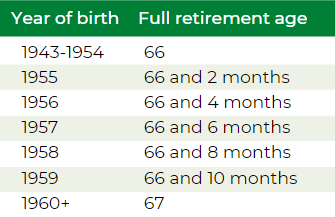
Your own Social Security benefit amount is less than your spousal benefit amount, which is equal to one-half of what your ex’s full benefit amount would be if claimed at Full Retirement Age (FRA).
 
Unlike with a married couple, your ex-spouse doesn’t have to have filed for Social Security before you can apply for your divorced spouse’s benefit, but this only applies if you’ve been divorced for at least two years and your ex is at least 62 years of age. If the divorce was less than two years ago, your ex must already be receiving benefits before you can file as a divorced spouse.


Unlike with a married couple, your ex-spouse doesn’t have to have filed for Social Security before you can apply for your divorced spouse’s benefit.

Divorce doesn’t disqualify you from survivor benefits. You can claim a divorced spouse’s survivor benefit if the following are true:

  • Your ex-spouse is deceased.
  • You are at least 60 years of age.
  • You were married for at least 10 years prior to the divorce.
  • You are single (or you remarried after age 60).

In the process of divorcing?

If your divorce isn’t final before you leave Microsoft, you’re still considered married, and your spouse may still have rights to your 401(k), including as your beneficiary. Before you request a distribution or rollover:

  • Talk with your attorney about timing and whether a QDRO will be needed.
  • Review your 401(k) beneficiary designation on Fidelity NetBenefits once the divorce is final.

Source: IRS, Retirement Topics: QDRO

Survivor Checklist

BAC-HTML-Checklist

In the unfortunate event that you aren’t able to collect your benefits from your company, your survivor will be responsible for taking action.

What your survivor needs to do:

  • Report your death. Your spouse, a family member or even a friend should call your company’s benefits service center as soon as possible to report your death.

  • Collect life insurance benefits. Your spouse, or other named beneficiary, will need to call your company's benefits service center to collect life insurance benefits.

If you have a 401(k) balance:

  • Claim the 401(k) account. Your beneficiary should contact Fidelity NetBenefits at (888) 810-6738 to claim it and review distribution options. A surviving spouse can generally roll the balance into his or her own IRA.

  • Be prepared financially to cover living expenses. Life insurance and retirement account claims can take time, so your spouse should have enough savings to cover expenses in the meantime.

If your survivor has medical coverage through Microsoft:

  • Decide whether to continue medical coverage.

  • If your survivor is covered as a dependent on your Microsoft medical plan when you die, he or she may be able to continue it through COBRA by paying the full premium. Contact the Microsoft COBRA Service Center at 833-253-4929.

Life After Your Career

TRG-HTML-Life-After-Career-Aug-30-2022-05-40-26-09-PM
 
While you may be ready for some rest and relaxation, without the stress and schedule of your full-time career with your company, it may make sense to you financially, and emotionally, to continue to work.
Financial benefits of working

Make up for decreased value of savings or investments. Some people continue to work to make up for poor performance of their savings and investments.

Maybe you took an offer from your company and left earlier than you wanted with less retirement savings than you needed. Instead of drawing down savings, you may decide to work a little longer to pay for extras you’ve always denied yourself in the past.

Meet financial requirements of day-to-day living. Expenses can increase during your retirement from your company and working can be a logical and effective solution. You might choose to continue working in order to keep your insurance or other benefits - some employers offer health coverage to part-time workers.
Emotional benefits of working

You might find yourself with very tempting job opportunities at a time when you thought you’d be withdrawing from the workforce.

Staying active and involved. Retaining employment after your previous job, even if it’s just part-time, can be a great way to use the skills you’ve worked so hard to build over the years and keep up with friends and colleagues.

Enjoying yourself at work. Just because the government has set a retirement age with its Social Security program doesn’t mean you have to schedule your own life that way. Many people genuinely enjoy their employment and continue working because their jobs enrich their lives.


Individuals interested in planning their retirement may be interested in live webinars hosted by experienced financial advisors. Click here to register for our upcoming webinars.

Sources

Sources (graphic)6